The Scrum Master – a key role for project success
What is a Scrum Master and how does the Scrum Master support the organization for an agile future and help the team stay on track?
The following article is written as part of my collaboration with AI Insider and it originally appeared here.
The role of a Scrum Master in a team or organization is often misunderstood. This article’s scope is to raise awareness about what are and what are not the responsibilities of a Scrum Master and why having a Scrum Master might benefit your company. But before diving into all that, let’s understand the context.
Background
Scrum is a framework created by Ken Schwaber and Jeff Sutherland that helps organizations and teams handle complex problems through adaptive solutions, achieve goals, and create value. The theory, the values, roles, events, and artifacts are described at length in “The Scrum Guide”, a good starting point for anyone who wants to be more agile. This guide is not a rule book to be followed step by step, but a set of guidelines that can help companies or teams to use or create processes and techniques that bring value to their situation, regardless of what that value means to them. A video explaining how Scrum works, in a nutshell, is available here.
Some advantages of adopting Scrum are:
- A working version of the product is available any time
- Higher revenue (quick opportunity for feedback from customers due to the often releases)
- Lower costs
- Effective use of time and money
- Possible changes can be incorporated easily
- Better visibility of product direction
- Large projects are divided into smaller, more manageable iterations
For example, in one of our projects, at AI Insider, the Scrum Team worked on a product on both the software and hardware parts. After each 2-week sprint, we were able to provide the client a working version of the application ready to be tested in the real environment. This way, we received quick feedback that enabled us to incorporate any change fast and easily
What is a Scrum Master?
The Scrum Master is part of the Scrum Team together with the Product Owner and the Development team. All roles are considered equally important; there are no hierarchies. The Scrum Team is a cross-functional and self-managing team whose focus is to achieve the organizations’ or teams’ goals. The team is responsible for all product-related activities, from stakeholder collaboration, verification, maintenance, operation, experimentation, and research and development, to anything else that might be required to deliver an iteration of value each sprint.
The purpose of the Scrum Master is to mainly foster an environment that enables the use of the Scrum framework as efficiently as possible. The Product Owner creates and maintains the product backlog with everything known to be needed for the product. The Scrum Team delivers an increment of value at the end of each sprint. The Scrum Team and the stakeholders inspect the team dynamics, their ways of working, processes, tools and make changes, if needed, to improve the rest of their collaboration.
The Scrum Master is a coach, a teacher, a mentor, and a facilitator – a servant leader for both the organization and the team. It is accountable for promoting Scrum and helping everyone understand the theory, the values, roles and responsibilities, events and artifacts, and how they all tie together. By creating constant opportunities for inspection and adaptation, the Scrum Master is an enabler of the effective implementation of Scrum. He or she is a change agent who fosters a mindset based on collaboration and a healthy work environment. Also, the Scrum Master has a vital role in providing structure and visibility for processes and ways of working.
How does a Scrum Master support the organization?
The Scrum Master trains and leads the organization in being agile and adopting the Scrum framework. Some examples are, but are not limited to:
- Analyzing the current ways of working
- Planning and organizing the implementation of Scrum, depending on the particular situation of the organization, including recommending a detailed transition plan to the new way of working
- Identifying bottlenecks
- Improving communication
- Recommending, helping configure and/or train people to use a suitable project management tool (e.g., Azure Boards, Jira)
For instance, in one of our projects, the Scrum Master enabled the adoption and configuration of the Azure Boards according to the specific project structure. Usually, this approach is a proactive way of starting the project by putting the practical knowledge to the use of the project.
How does a Scrum Master assist the Scrum Team?
Although part of the Scrum Team, due to the servant leader quality, the Scrum Master assists the team in several ways. The Scrum Master:
- Helps the Product Owner understand the need for a clear roadmap, product direction, and product backlog visible to everyone in the team and organization
- Teaches the Product Owner effective techniques for defining Product Goals and backlog management
- Coaches the team members in autonomy, collaboration, and multidisciplinarity
- Facilitates conflict resolution
- Drives the creation of a Definition of Ready and Definition of Done and holds the team accountable for following them
- Detects possible risks early on and encourage the removal of impediments
- Facilitates meetings as needed or requested
- Makes sure the agreed processes are followed by everyone, and the Scrum events take place, are productive, and kept within the timebox
In all the meetings we facilitate, we keep in mind and follow some of the best practices. We make sure only the relevant people attend the meeting, and we send the meeting agenda beforehand, so the team uses their time as efficiently as possible. We make clear the purpose of the gathering, we ensure every team member has the opportunity to speak up, and that we achieve our scope by the end of our meeting.
What skills does a Scrum Master need?
The Scrum Master must be an active listener, an observer, have patience, good communication skills, leadership skills, organizational skills, be assertive, motivate and influence people, and build psychological safety. The Scrum Master has to be aware of the team dynamics, know when and how to give feedback or intervene, protect the team from outside disruptive behaviors, and encourage a self-managing and trust-based team culture.
Scrum Masters must have soft skills. Although technical skills are not a requirement, they are an advantage. Scrum Masters with technical backgrounds have more credibility, they relate to their colleagues easier, and, most of the time, have a better overview and understanding of the entire project. This way, their suggestions for improvement are more likely to be accepted and implemented by the team.
Of course, technical skills can be learned and soft skills cultivated, but not everyone can be a Scrum Master. To a large extent, being a Scrum Master depends on the maturity of the person and their willingness to embark on a continuous learning journey.
What are the challenges a Scrum Master faces?
Scrum framework has been used in organizations for many years now, but there are still some misconceptions and problems a Scrum Master comes across. Here are some aspects that hinder the Scrum Master’s work and make the organization’s environment less efficient in delivering results:
- The organization doesn’t understand what agility is.
- The team adopts Scrum without knowing or understanding its principles.
- The team doesn’t have any formal training in Scrum.
- The team or the organization are resistant to change.
- The members of the team are constantly changing.
- The Scrum Master is an assistant for the team (e.g., Azure Boards/Jira administrator, the person who sets up the meetings in everyone’s calendars, takes notes at meetings).
- The Scrum Master is confused with a Project Manager.
- The team assumes the Scrum Master has to give them work, tell them how to do their job, or that they are the Scrum Masters’ direct reports.
- The Scrum Master must plan and set goals for the team (e.g., sprint goal, choose sprint backlog, set deadlines, manage tasks, micro-manage the team).
- The Scrum Master is responsible for removing all the impediments or solving all the problems the team has.
- The Scrum Master is the middleman through which the team communicates with other departments or teams.
- The Scrum Master must have another role in the team (e.g., developer or product owner).
- The team or the organization had a Scrum Master as a project manager with the command-and-control type of leadership.
- The Scrum Master is changed often.
- The Scrum Master must deliver fast results, regardless of factors such as how long the team members have worked together, their understanding and/or experience with Scrum.
Looking from this angle, the successful implementation of any agile methodology, especially the Scrum framework, takes time and requires a dedicated Scrum Master that has an overview of the situations, especially the problematic ones, without being emotionally involved. It is a continuous improvement process, and taking shortcuts for fast results is not recommended.
Challenges I encountered working as a
Scrum Master and how I addressed them
Scrum Master and how I addressed them
Speaking up
When the team adopts Scrum without knowing or understanding its principles
The team members were talking over each other in our meetings. The solution that proved effective was a plush toy. The colleague who held the plush toy could speak up in the meeting while others waited for their turn. It was a way to align the team to the Scrum values and principles. This solution saved the team time, reduced frustration, and created a more productive work environment.
Keeping teams focused
When the team or the organization had a Scrum Master as a project manager with the command-and-control type of leadership
Some time ago, I took over two geo-distributed teams as a Scrum Master. Before I joined, the team members used to be called in never-ending meetings for reporting purposes several times a day. This approach disrupted the development time and frustrated the team members. Once I took over, I redesigned the mandatory Scrum meetings, sending the purpose and the agenda beforehand and ensuring the scope was held. Consequently, the teams felt their time was well-invested, so, overall, their focus, engagement, and productivity increased.
Understanding the roles
When the organization doesn’t understand what agility is or the team adopts Scrum without knowing or understanding its principles
In several Scrum Teams, the Product Owners didn’t fully understand their roles. Due to a few discussions and workshops we had together, plus the resources suggested for them to understand a Product Owner’s responsibilities, they successfully created and shared a product roadmap with the Scrum team and the organization. Based on that, the product backlog started to be written according to the needs of the development team. This way, less time was spent in the refinement sessions, fewer bugs were found in the implementation, and customer satisfaction increased.
Stand out
The role, responsibilities, and skills of a Scrum Master are diverse. There is one consideration that rises above these when thinking about having a Scrum Master in your organization. On top of training and leading the organization in being agile, adopting the Scrum framework, and delivering value to your customers regularly, the team members can focus on what they do best. And when the team does that, they can achieve high performance and project success towards consistently meeting the requirements of the business.
Do you have a Scrum Master role in your organization? If you do, what changes did the Scrum Master bring to your team or organization until now? If you don’t have a specialized Scrum Master in your organization or team, what problems do you think the Scrum Master can solve? And if you are a Scrum Master, how did your journey start? What did you learn from your experience, and what are the next steps for you?
How to choose the agile project management tool to suit your practice
Is there an agile project management tool more suitable than another? How to get the most value from such a tool? What are the assets and the constraints to consider? Here is an analysis of Azure Boards and Jira.
The following article is written as part of my collaboration with AI Insider and it originally appeared here.
Do you know why your organization or team needs an agile project management tool and what you need to consider to ensure you get the value you expect for your money from it?
I will be explaining what a project management tool is, some questions to raise in your journey to find the best that fits your needs, a head-to-head comparison of the two most popular choices used in the teams I worked with, and when I recommend you select each of them, so read on.
What is a project management tool?
A project management tool is a software that helps teams plan, organize, manage, and optimize resources across a project or organization. Adopting such a tool is important from three angles. First, it increases visibility and provides a clear overview of the work that has been done or needs to be completed. Second, it keeps the team organized and accountable in doing their work and following the agreed processes. Third, it minimizes miscommunication problems and the occurrences of bottlenecks.
What are your needs?
In case you were tasked with proposing a new project management tool, or you took the initiative yourself after seeing your current one doesn’t address the needs of the organization, you embarked on a challenging quest.
Although all tools have similar features, this is a decision that is not to be made every day, so it is crucial to ask yourself a few questions before investing in one:
- Are you part of a new organization looking to work in a more structured way, or do you need a solution to solve problems you identified in the current way of working of your well-established organization?
- What are the problems you are trying to solve?
- How would this tool help?
- Are there any features this tool must have?
- Do you plan to integrate the current tools you’re using with this project management tool?
- Do you need to share information/reports with other departments or stakeholders?
- Is there a methodology the organization is already working with, and is this tool suitable for it?
Who will use it?
Regardless of the organization or type of project you plan to use the project management tool for, it’s essential to know how many people or teams will use it every day.
Some of the things to consider are:
- What are the departments that will use the tool?
- Are the teams technical?
- Are they working on multiple projects at the same time?
- What did team members use in the past, and what did they like about those tools? Does this tool meet their needs?
- Would they benefit from integration with other tools, such as Git?
- What are the current trends and recommendations on industry websites? What are other companies with similar profiles using?
Implementing a project management tool for the first time or switching to another one it’s a long-term commitment and investment. Analyzing and setting up processes need the leadership team’s support and a plan on how the transition will be made. It is not mandatory, but it is highly recommended to have a person who has experience with the tool you’re choosing and knows how to set it up quickly and easily. Then, think about who will train the team(s) in using it. Depending on how open your organization is to change, this process may take time. It is also advisable to constantly ask for feedback from users and adapt if needed.
Azure Boards vs. Jira
There are a few options available on the market for project management tools, such as Hive, Trello, Asana, ProjectManager.com, ClickUp, Taiga.io, Jira, and Azure Boards. Choosing one that fits your needs and your budget can feel overwhelming.
Let’s look at two of the most popular choices for agile delivery management, Azure Boards and Jira. Below there is a direct comparison of the most relevant topics. Any other information you are interested in and are not covered by this article can be found on Azure Boards and Jira official websites.
|
|
Azure Boards |
Jira |
|
Developed by |
Microsoft |
Atlassian |
|
Platforms |
Cloud, SaaS On premises: part of Azure DevOps Server
|
Cloud, SaaS Data Center (on premises): new license can’t be bought anymore; support will end on the 2nd of February 2024. |
|
Accessibility |
Web-based Integrated with Teams |
Web-based Desktop application Mobile application Integrated with Teams, Slack, and many other tools |
|
Plans and pricing |
Cloud: • Basic plan: First 5 users free, then $6/user/month • Basic plan + Test plans: $52/user/month Server: • A 3-year commitment is needed; clients can also move to the cloud whenever they choose to for free. • A 3-year commitment is not mandatory if the payment is made through Azure platform monthly, Visual Studio ($45/user/month for Professional or $250/user/month for Enterprise) and one of the plans for the Cloud are purchased. Details about the plans and pricing: here. |
Cloud: • Free for up to 10 users • Standard plan: $7/user/month • Premium plan: $14/user/month • Enterprise plan: personalized offer based on discussion with their sales team.
Details about the plans and pricing: here. |
|
Support |
Basic support included for all Azure customers: 24/7 self-help resources, ability to submit as many support tickets as needed, Azure Advisor (a personalized guide for best practices), and Azure health status and notifications. Support plan can be upgraded for an additional fee per month. |
Support via email, help desk, forums, FAQs, knowledge base, phone, 24/7 live rep and chat. |
|
Training |
Included for the Professional direct support plan, which costs $1.000 per month. |
Free tutorials and courses; paid courses, on demand for individuals or teams (virtual or onsite). Prices range depending on the option chosen from $100 to $10.000. |
|
Project templates |
By default, the organization contains 4 types of project templates, called processes: Basic, Agile, SCRUM and CMMI (Capability Maturity Model Integration). Details: here. Custom processes can be created by the admin of the organization.
|
For Software Development, there are 3 types of custom templates: Kanban, SCRUM, and Bug tracking. Other project templates are available for Service Management, Project Management, Marketing, Human Resources, Personal, Operations, Legal or Sales departments. Details: here. Custom templates can be created by the admin of the organization. |
|
Item types supported |
Configurable for each project. The layout is also configurable: epic, feature, impediment, bug, product backlog item, task, test case, test plan and test suite. |
Configurable for each project. The layout is also configurable: epic, story, bug, idea, task, subtask. |
|
Roadmap |
Not available. |
Jira has a roadmap feature integrated that shows a breakdown of all the epics and their user stories and the dependencies between them. It lets you see progress in a timeline view (weeks, months, or quarterly) and export it in a PDF version. An advanced roadmap feature is available for Premium and Enterprise plans, which allow planning and tracking work across multiple teams and projects based on capacity, manage dependencies and competing priorities and explore alternative scenarios. |
|
Sprints |
Started by default. |
Have to be started by the user. The configuration allows multiple sprints to run in parallel. |
|
Capacity |
Capacity can be set for each team member in a sprint for any plan. |
Available only for plans that support the advanced roadmap feature (Premium and Enterprise plans). |
|
Workflow |
Editable in both text and diagram mode. |
Editable in both text and diagram mode. |
|
Automation |
Processes can be automated with Microsoft Flow.
|
Directly from Jira. Processes can be automated (e.g., when a pull request is merged, the ticket can be automatically assigned to a QA). |
|
Documentation |
Integrated Wiki. Text can be customized as needed. |
Additional product must be installed: Confluence. It comes with its own plan and pricing model. |
|
Source control |
Only Git and TFVC are supported. |
Plugin must be installed for the tool used (e.g., BitBucket/Git/GitHub). |
|
Reporting |
Reports can be generated on the Dashboard, in customizable widgets. |
Separate section for reports included in each plan. |
|
Status updates |
Status updates and progress tracking is in real time and visible to the entire team. |
Status updates and progress tracking is in real time and visible to the entire team. |
|
Feedback |
Communication can be done on each particular task, visible to each team member, including giving feedback, sharing a status update or asking questions. |
Communication can be done on each particular task, visible to each team member, including giving feedback, sharing a status update or asking questions. |
|
Security |
Different users with different permission levels can be configured by an admin user. |
Different users with different permission levels can be configured by an admin user. |
So, what and how to choose?
Azure Boards
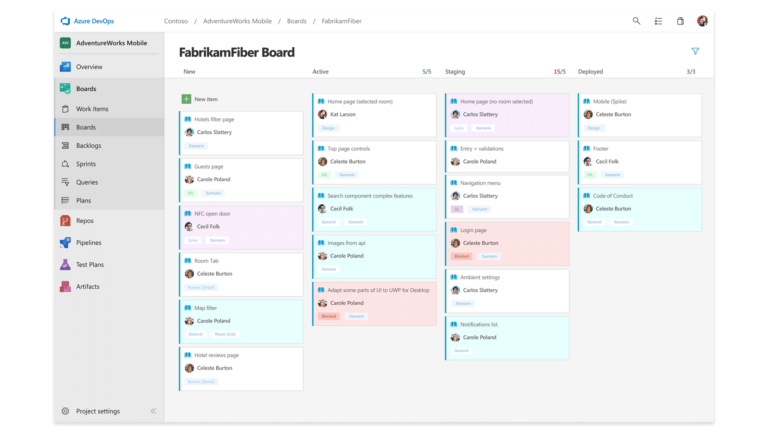
It might be more suitable to go for Azure Boards if or when you:
- Have in your team non-technical people who will use . The ramp-up period for these people might take less time than you wish to spend on this with other tools.
- Prefer to have all the information on your server. This comes with the benefits of having full control, easy and quick access to the infrastructure, including its resources and security settings, and customization at your own pace and finances. Of course, the initial investment or the operating costs may be high and in-house maintenance is required. Azure also allows you to move to the cloud whenever you wish, without additional costs.
- Already use other Microsoft services on a daily basis, including Office 365.
- Want an integrated out of the box Continuous Integration system.
- Would like to have a way to better manage the sprint allocations per team member and to identify bottlenecks easier without paying extra for another plan (the capacity per sprint feature is included in the basic plan).
Jira
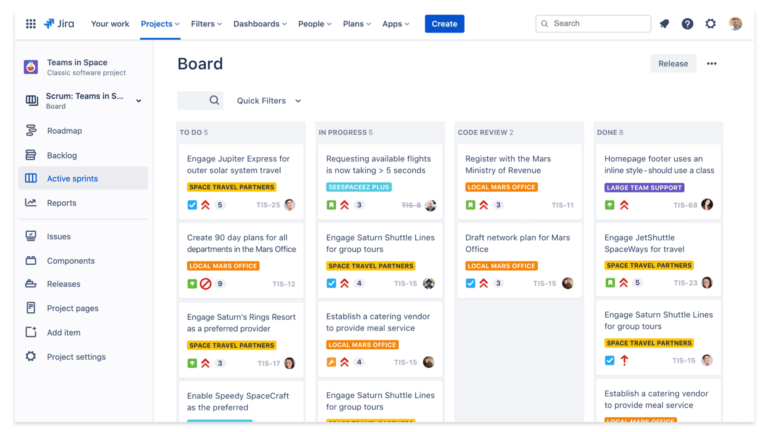
It might be more suitable to go for Jira if or wgen your organization or teams:
- Already use other tools and would like to integrate them with Jira. Atlassian has a wide variety of plugins and add-ons, both open source and paid.
- Need to have a powerful reports system and roadmap available at all times.
- Have to run multiple sprints in parallel for the same product backlog.
- Consists of mostly technical people that can use and control this very customizable tool, and sometimes the organization is not able to allocate that time for it.
Remember that, in the end, both tools can help you manage your project(s) successfully. So, when you choose the agile project management tool to suit your practice, my experience shows that it all comes down to:
- Your preference regarding the UI/UX
- Your company’s or team’s type and size
- The tools you already have in place
- The available budget
- The time you want to invest in adopting the tool and training people
- How the tool can solve the problems you identified in your organization or team (the must-have features)